



SAP Fiori Launchpad
The central, role-based entry point for all SAP applications – Fiori apps, WebGUI transactions, and external links in a single interface.








What is the SAP Fiori Launchpad?
The SAP Fiori Launchpad is the central starting point through which users access their SAP applications – whether modern SAPUI5 apps, classic WebGUI transactions, Web Dynpro applications, or external URLs. Which apps a user sees is controlled by the SAP authorization concept via PFCG roles.
With SAP Fiori 3, available from SAP S/4HANA 2020 onward, SAP fundamentally extended the Launchpad's layout: alongside the classic Catalogs-and-Groups model, the new Spaces & Pages concept is now available, organizing apps into structured, role-based workspaces instead of a single tile wall.
Your Requirements
What companies need today
- A single entry point for every application type – Fiori, WebGUI, Web Dynpro, external URLs
- Role-based visibility of apps for each group of employees
- A clear starting page even with hundreds of apps in the system
- Migration from the classic tile home page to the modern Spaces & Pages layout
- Central administration without a sprawl of custom catalogs
- A consistent user experience across cloud and on-premise systems
Our Solution
What SERKEM delivers
- Designing the Spaces & Pages structure around your roles and business areas
- Building and maintaining Catalogs, Groups, and PFCG roles on the SAP standard
- Migrating existing tile landscapes to Spaces and Pages
- Integrating every application type: SAPUI5, WebGUI, Web Dynpro, external URLs
- Administration through the Fiori Launchpad admin tools instead of manual custom configuration
- Training key users and administrators during live operations
Layout models
Catalogs & Groups vs. Spaces & Pages
SAP continues to support both models – the right choice depends on system age and how far modernization has progressed.
Catalogs & Groups
The original Fiori Launchpad layout, still in use in many established systems today.
- Catalogs bundle apps for a specific role
- Groups define the subset of apps visible on the home page
- PFCG roles reference Catalogs and Groups
- A single, static tile home page with no structured navigation between workspaces
Ideal when…
An existing system with an established Catalog/Group model continues in operation and no migration is planned.
Spaces & Pages
The modern layout from the SAP Fiori 3 innovations, organizing apps around business roles instead of a single tile wall.
- A Space forms the entry point for a business role
- Pages group apps into thematic sections for each work context
- Better performance through on-demand loading of only the apps needed
- Structured navigation between multiple assigned Spaces
Ideal when…
A new system is being set up, or an existing Launchpad landscape is due for modernization.
Structure
The four building blocks of Spaces & Pages
Each level takes on a clearly defined role in the Launchpad's structure.
Space
The entry point for a business role – shows exactly the information and functions assigned to that role.
Page
Contains the apps for a specific work context within a Space and guides users through their tasks in a structured way.
Section
Divides a Page into thematic blocks, so related apps appear together instead of scattered around.
Tile
The individual tile used to launch an app – static with an icon and title, or dynamic with live figures from the system.
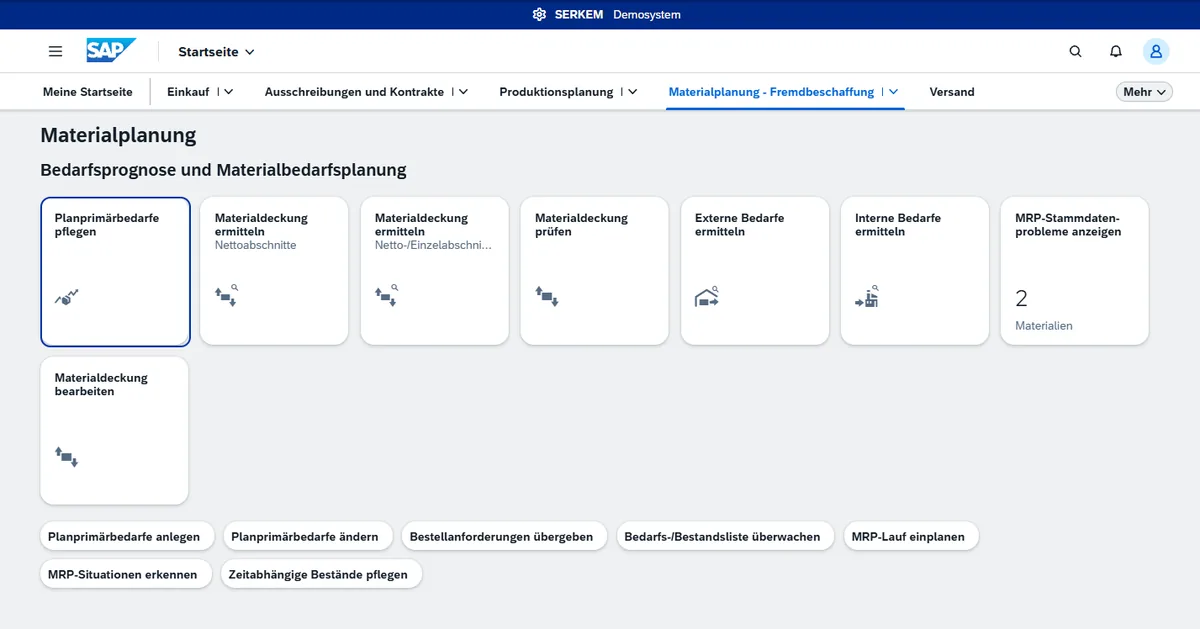
The home page in Spaces layout
Users navigate between their assigned Spaces via a fixed top bar, while the content area shows the apps of the currently active Page, grouped into sections.
- Top navigation bar with all assigned Spaces
- Tile grid grouped into named sections for each work context
- Dynamic tiles with live figures straight from the SAP system
- Unified access to SAPUI5, WebGUI, and external applications
Click the image to enlarge
Consistently on the SAP standard
We build Spaces, Pages, and roles on the SAP standard – traceable, and without a sprawl of custom code.
Rapid prototyping instead of concept slides
You see a working Launchpad prototype for your most important roles early in the project.
Over 25 years of SAP experience
From role design to migrating existing tile landscapes: we know the details that matter.
News, real-world insights, and perspectives from our SAP experts. (German-language articles)

ViDA: Was die EU-Meldepflicht bis 2030 verlangt

E-Rechnung Frankreich 2026: sind Sie ab September bereit?

E-Rechnungspflicht: was bis 2028 auf Sie zukommt
ECC-Support endet 2027: das Fenster ist enger als gedacht

Fiori-Apps ohne Handarbeit: Fiori elements und RAP
Frequently Asked Questions
FAQ on the SAP Fiori Launchpad
Answers to the most important questions about the SAP Fiori Launchpad.
Catalogs and Groups are the classic model: Catalogs bundle apps for a role, and Groups define the subset visible on the home page. Spaces and Pages, available since SAP S/4HANA 2020, instead organize apps around business roles with structured navigation between multiple workspaces and thematically grouped sections. SAP continues to support both models.
No, an immediate migration isn't mandatory – SAP supports both layouts. For new systems and larger modernization efforts, however, Spaces & Pages is recommended for its better structure, performance, and navigation between workspaces.
The Launchpad is the shared entry point for SAPUI5 apps, classic WebGUI transactions (defined as a navigation target via transaction LPD_CUST), Web Dynpro applications, and external URLs. As a result, users don't need to switch between different interfaces.
Through classic PFCG roles that reference Catalogs and Groups – or, in the Spaces & Pages model, by assigning Spaces and Pages to the corresponding roles. Ultimately, which apps a user sees depends on the roles assigned to them, not on the Launchpad layout itself.
A static tile shows only the icon and title of the linked app. A dynamic tile additionally displays live content from the SAP system – such as a KPI, the number of open items, or a similar current value, before the app is even opened.
Yes. SAP S/4HANA Cloud uses the Fiori Launchpad by default in the Spaces & Pages layout as its central entry interface. The core concepts – Space, Page, Section, Tile – are identical across cloud and on-premise systems.
Ready for a clean, role-based Fiori Launchpad?
SERKEM guides you from role design through building Spaces and Pages to migrating your existing tile landscape.