



SAP Build Apps
Web and mobile apps without a single line of code — built directly on SAP data. The visual canvas editor connects business and IT, cutting development effort for operational apps significantly.








What is SAP Build Apps?
SAP Build Apps (formerly SAP AppGyver) is the low-code app platform of the SAP Business Technology Platform. Its visual canvas editor lets you build web apps, progressive web apps, and native mobile apps for iOS and Android — without programming knowledge, but with full SAP integration.
Direct connectivity to SAP backends via OData and REST makes SAP Build Apps the fastest way to close the operational gaps between SAP processes and the people who run them. Warehousing, production, procurement, maintenance — every department has processes that would benefit from an app. With SAP Build Apps, these apps become reality without touching the SAP core.
Your starting point
Why operational apps are missing
- Mobile apps for warehouse, production, or field service are missing — processes still run on paper or in Excel
- Classic ABAP or Fiori development is too costly for simple use cases and ties up developer capacity
- Existing point solutions run outside of SAP and have to be filled with data manually
- Business teams know what they need but can't build it without IT involvement
- No unified mobile strategy for iOS and Android — separate projects, separate maintenance
- Custom development inside the SAP core becomes an upgrade risk with every release
What we deliver
SAP Build Apps with SERKEM
- Visual canvas editor: drag-and-drop instead of code — business teams can help shape the app directly
- Native OData connectors: direct connectivity to S/4HANA, ECC, and BTP systems within minutes
- Multi-platform from a single project: one app runs on web, iOS, and Android with no duplicate effort
- AI acceleration: Joule generates app structures, data entities, and business logic on request
- Clean Core: no modifications to the SAP core — every S/4HANA upgrade stays straightforward
- Deployment in SAP Build Work Zone, as a PWA in the browser, or as a native app in your enterprise store
How it works
From idea to production app
SAP Build Apps reduces the path to a finished app to three clearly separated phases — understandable for business teams, clean in architecture for IT.
Connect your backend
OData services, REST APIs, or BTP destinations are configured as data sources. SAP Build Apps automatically detects the available entities and fields — no manual interface documentation needed.
Build the app visually
Pages, components, and navigation are assembled in the canvas editor via drag-and-drop. Business logic is defined through visual flows — without code. Joule can suggest entire app structures on request.
Deploy & use
The finished app is integrated into SAP Build Work Zone, deployed as a PWA in the browser, or distributed as a native app for iOS and Android. One build project, three platforms, one maintenance line.
Canvas Editor
Build apps like you'd design a presentation — visually, directly, with no learning curve
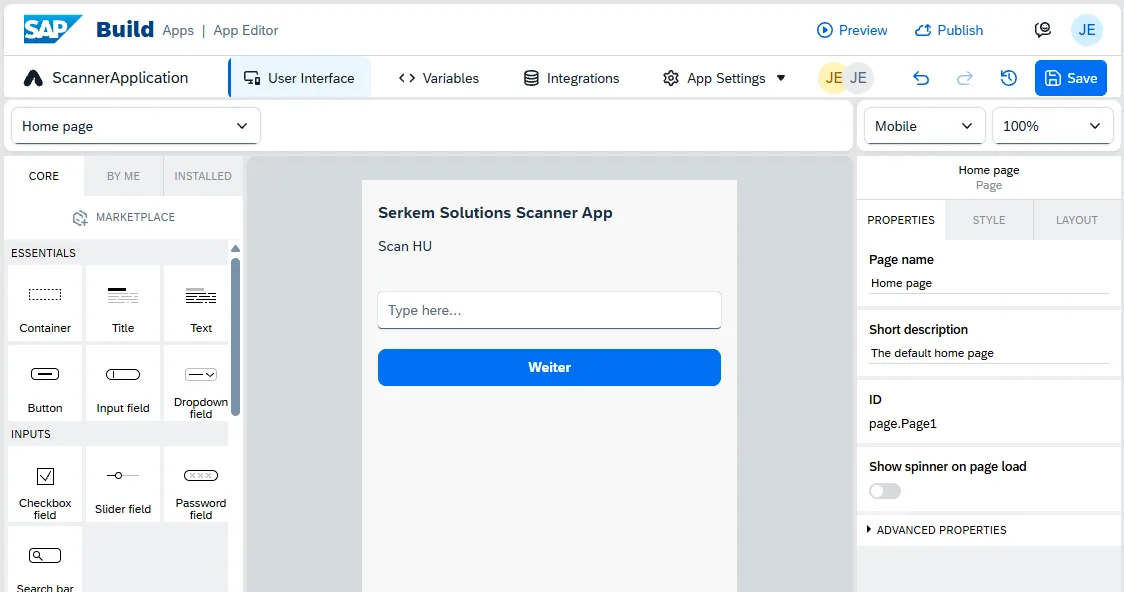
The canvas editor is the heart of SAP Build Apps. Pages are built by dragging and dropping UI components — forms, lists, cards, scanners, cameras. Business teams can create and iterate on drafts while IT teams validate the SAP connectivity and business logic. Preview mode makes every stage instantly testable.
- 100+ pre-configured UI components: forms, tables, scanners, charts, maps
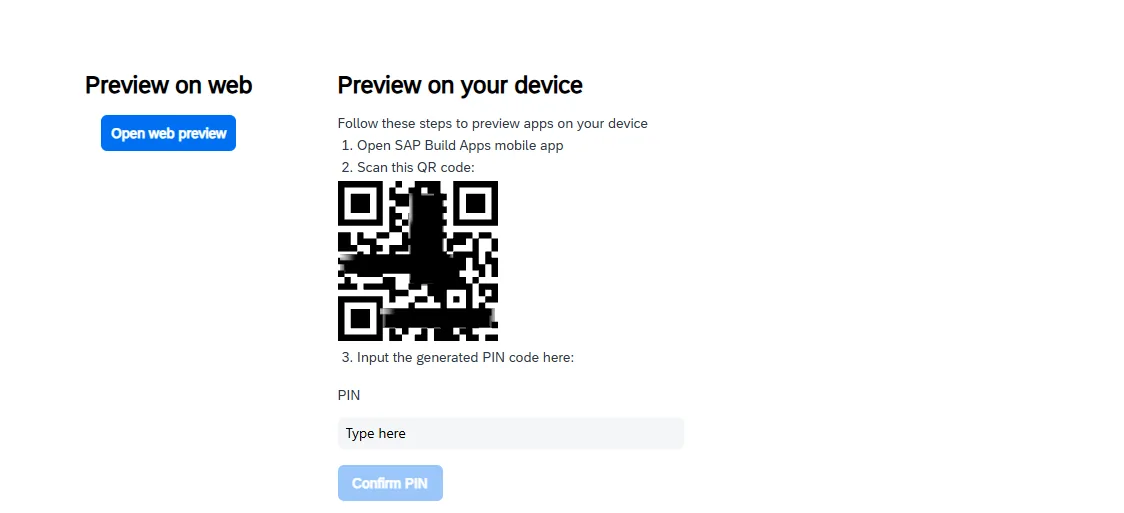
- Live preview in the browser and directly on your mobile device with no build step
- Formula editor for calculations and conditions without programming knowledge
- Theming: your brand colors, fonts, and logo applied centrally across the entire app
Click image to enlarge
SAP Integration
SAP data in the app — no middleware, no manual synchronization
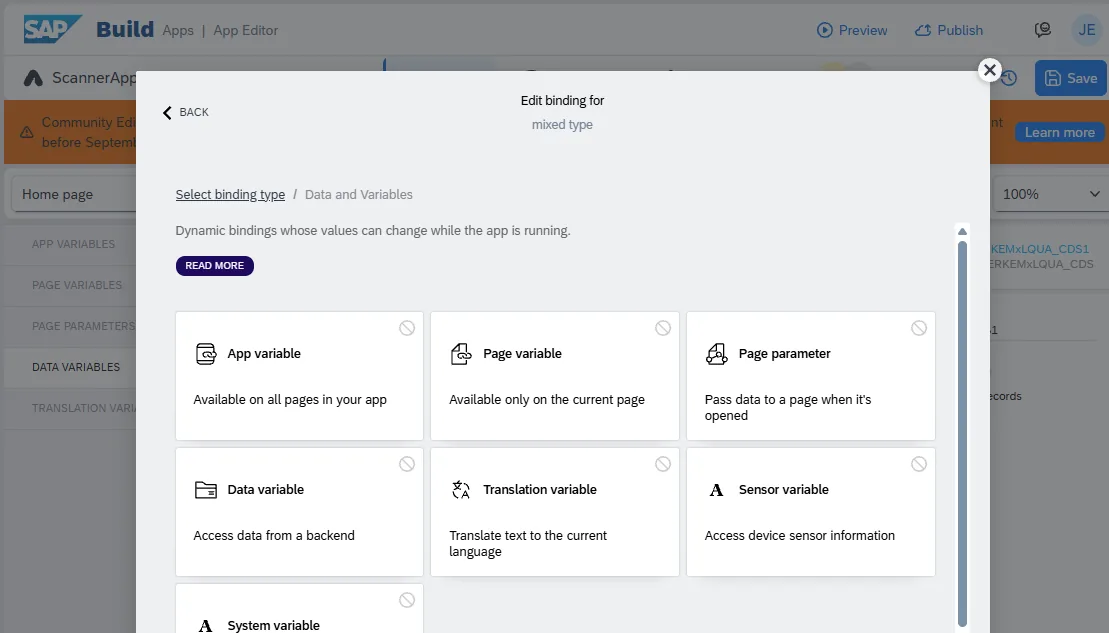
SAP Build Apps reads and writes SAP data directly through standardized OData services. Once a BTP destination points to the SAP backend, the Data tab automatically detects every available entity — materials, purchase orders, batches, storage bins. Filtering, sorting, and pagination are all configurable without a single line of code.
- OData v2 and v4 natively supported — including complex navigation properties
- REST APIs for non-SAP backends and external services (weather, maps, tracking)
- Offline mode: cache data locally and sync automatically once connected
- BTP Destination Service as a central connection layer — no password stored in the app
Click image to enlarge
Multi-Platform
One app, three platforms — web, iOS, and Android with no duplicate effort
An application built in SAP Build Apps is developed once and deployed to every target platform. The built-in build service generates native iOS apps, Android APKs, and web applications from the same project. Changes to the app's design or logic land on every platform simultaneously after a build.
- Native iOS build for the App Store and enterprise distribution
- Android build for the Play Store or internal MDM distribution
- Web app and PWA for the browser — no app store process required
- Integration into SAP Build Work Zone as a tile in the employee portal
Click image to enlarge
Use Cases
Typical SAP Build Apps use cases
The most common operational apps our customers build with SAP Build Apps — from idea to production rollout.
Warehouse / Logistics
Mobile goods receipt posting
Barcode scanner app for goods receipt: scan the material, capture the quantity, choose the storage bin — direct posting into SAP EWM or MM without a PC.
Procurement / Finance
Approval workflow
Purchase requisitions and invoices approved on the smartphone — with push notifications, a comment field, and direct posting into S/4HANA.
Maintenance
Asset inspection & notifications
Mobile inspection app: scan the asset, work through a checklist, attach photos, create an SAP PM notification — right from the tablet on the shop floor.
HR / Production
Time tracking & confirmations
Production confirmations and time tracking right at the workstation — scan the order, enter the quantity produced, post the confirmation to SAP PP.
Sales / Field Service
Visit reports & customer info
Field reps see current customer master data, open quotes, and order history — visit reports are written straight back into CRM/SAP.
Facility / Services
Room booking & ticketing
Book meeting rooms, log service tickets, track status — one app for internal services that reads from and writes to the SAP ticketing system.
Why SERKEM
SAP Build Apps, implemented right
Low-code means less code, not less architecture. We bring the SAP and BTP knowledge needed so the first app isn't the last.
Faster to your first production app
With a structured approach — use-case analysis, app design, OData connectivity, testing — a first production app is ready to go without a long project lead-in.
SAP knowledge included
We know SAP data models, OData endpoints, and BTP architecture. That saves alignment loops between app developers and SAP consultants — with us, that's one team.
Clean Core from day one
Every app we build accesses SAP exclusively through standardized APIs. Not a single ABAP exit, not one modification to the SAP standard — upgrade safety is a principle here, not a bonus.
Scales to multiple apps
The first app is just the start. We build the BTP infrastructure (destinations, identity, Work Zone) so every subsequent app builds on a finished foundation and goes markedly faster.
News, practical insights, and perspectives from our SAP experts. (German-language articles)
APIs im Griff: API-Management der Integration Suite
PI/PO läuft 2027 aus: der Weg zur Integration Suite
Build Work Zone: Launchpad ablösen — oder besser nicht?
Eine Datengrundlage für alles: SAP Business Data Cloud
Apps bauen, ohne den Kern zu berühren: SAP Build
Frequently Asked Questions
FAQ: SAP Build Apps
The most important questions on deploying, connecting, and licensing SAP Build Apps.
SAP Build Apps addresses two audiences: business teams who want to create operational apps without programming effort (citizen developers), and IT teams that need to quickly deliver mobile interfaces for SAP processes without burdening the SAP core. It's particularly well suited to logistics, production, maintenance, sales, and HR — anywhere processes need to become more mobile.
No programming knowledge is required to get started — that's the core of the low-code approach. Familiarity with the SAP data model (which OData services suit which processes) is helpful and is typically contributed by IT. For more complex logic and deployment configuration, we recommend a joint team of business and IT — or a structured implementation project with SERKEM.
SAP Build Apps uses the BTP Destination Service as a secure connection layer to the SAP backend. A destination is configured once in the BTP cockpit — after that, SAP Build Apps automatically detects all OData v2 and v4 services on the connected system. The app reads and writes data directly through these services, with no middleware or separate integration project required. For external REST APIs (non-SAP systems), an HTTP destination is set up.
Yes. SAP Build Apps supports offline scenarios through local data caching. Data is downloaded and stored locally when the app starts or while a connection is available. Changes (e.g., postings) are buffered in a local queue and automatically synchronized with the SAP backend the next time a connection is available. This is especially relevant for warehouses with limited Wi-Fi coverage or field service scenarios.
SAP Fiori is SAP's standard UI framework for SAP transactions and processes — developed by SAP, configured or extended via ABAP/UI5. SAP Build Apps is a standalone app development platform for new applications outside the standard SAP functional scope. Fiori remains the first choice for standard SAP processes; SAP Build Apps is ideal for custom operational apps that cover business requirements for which no SAP standard exists.
SAP Build Apps is included in the SAP BTP CPEA contract and can be activated via the BTP Service Marketplace. Consumption-based pricing models apply for runtime usage (users running the apps). A free trial is also available in the BTP free tier for pilot projects or getting started. We're happy to review, as part of a free consultation, how SAP Build Apps can be activated within your existing BTP license.
Get to your first production app faster
We support you from use-case analysis through app design and SAP connectivity to rollout on iOS, Android, and web — structured, with no detours, and with real SAP knowledge on the team.