



Custom CDS Views in SAP S/4HANA
Build your own data models directly on the SAP standard – as the foundation for Fiori apps, analytics, and OData services, without middleware and without detours.







What Are Custom CDS Views?
SAP ships SAP S/4HANA with Core Data Services (CDS) as its technical foundation: the Virtual Data Model (VDM), a network of SQL-based data models with business annotations instead of classic ABAP code. Custom CDS Views extend this model with your own, customer-specific views – without changing the SAP standard.
They are the shared data foundation for Fiori Elements apps, analytical evaluations, OData services, and the RESTful ABAP Programming Model (RAP). Anyone building their own reports, apps, or interfaces on SAP data can hardly avoid CDS.
Your Requirements
What Companies Need Today
- Custom evaluations and reports that don't exist in the SAP standard
- Data models as the foundation for your own Fiori Elements apps
- OData interfaces for external systems or mobile apps
- Extending SAP standard evaluations with your own fields
- Data models that stay stable even after a release change
- A clear decision: key user tool or ABAP development?
Our Solution
What SERKEM Delivers
- Analysis of the existing Virtual Data Model and suitable starting points
- Modeling your own CDS Views following SAP standard patterns
- Upgrade-safe extension instead of invasive modification
- Annotations for UI, analytics, and OData matched to the use case
- Connection to Fiori Elements and the RESTful ABAP Programming Model
- Advice on choosing between the key user tool and ABAP Development Tools
Building Blocks
What Makes Up a Custom CDS View
Four concepts that every custom data model in SAP S/4HANA builds on.
Virtual Data Model & Associations
CDS Views connect to existing SAP standard views via associations – instead of duplicating data, the existing data model is reused.
Annotations Instead of Code
Instead of ABAP logic, a CDS View contains SQL plus annotations like @UI, @Analytics, or @OData.publish – they describe how other components are allowed to use the data.
Extend Instead of Modify
With "Extend View," SAP standard views can be enriched with your own fields without modifying the original code – release- and upgrade-safe.
Foundation for RAP
For your own transactional applications, CDS Views serve as the data model of the RESTful ABAP Programming Model (RAP) – including business object logic and Fiori UI.
Architecture
From the SAP Standard to Your Own App
A Custom CDS View fits into an existing layered architecture instead of building a separate data world.
SAP Standard Database Tables
The operational data in S/4HANA – unchanged from the SAP standard.
SAP Standard CDS Views (VDM)
Basis and composite views delivered by SAP that prepare the tables for business use.
Custom CDS View
Your own view: new fields, custom filters, custom associations – built on layers 1 and 2, instead of replacing them.
Consuming Layer
Fiori Elements app, analytics evaluation, OData service, or RAP business object – depending on the annotations set.
Development
Modeling in the ABAP Development Tools
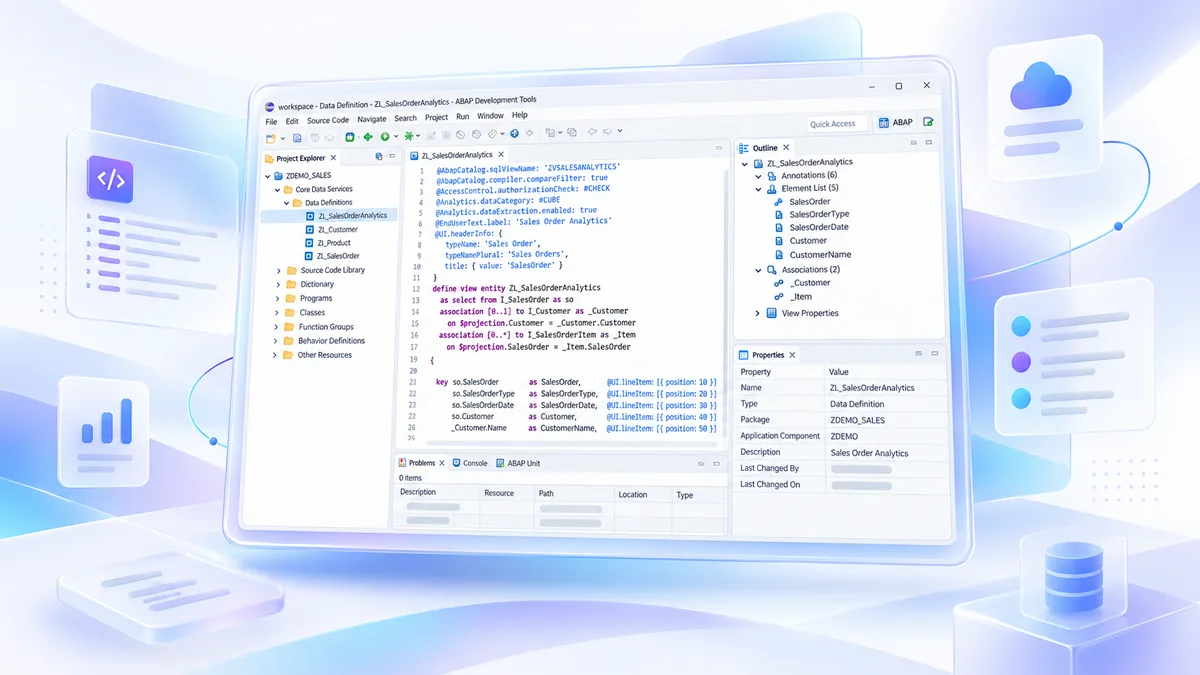
Developers define Custom CDS Views in Eclipse using the ABAP Development Tools (ADT) – as plain source text made up of an SQL statement and annotations, versioned in ABAP transport management like any other development object.
- Syntax highlighting and code completion for CDS and annotations
- Direct preview of the data selection in the Data Preview
- Traceable history via ABAP transport management
Result
An App, Straight from the Data Model
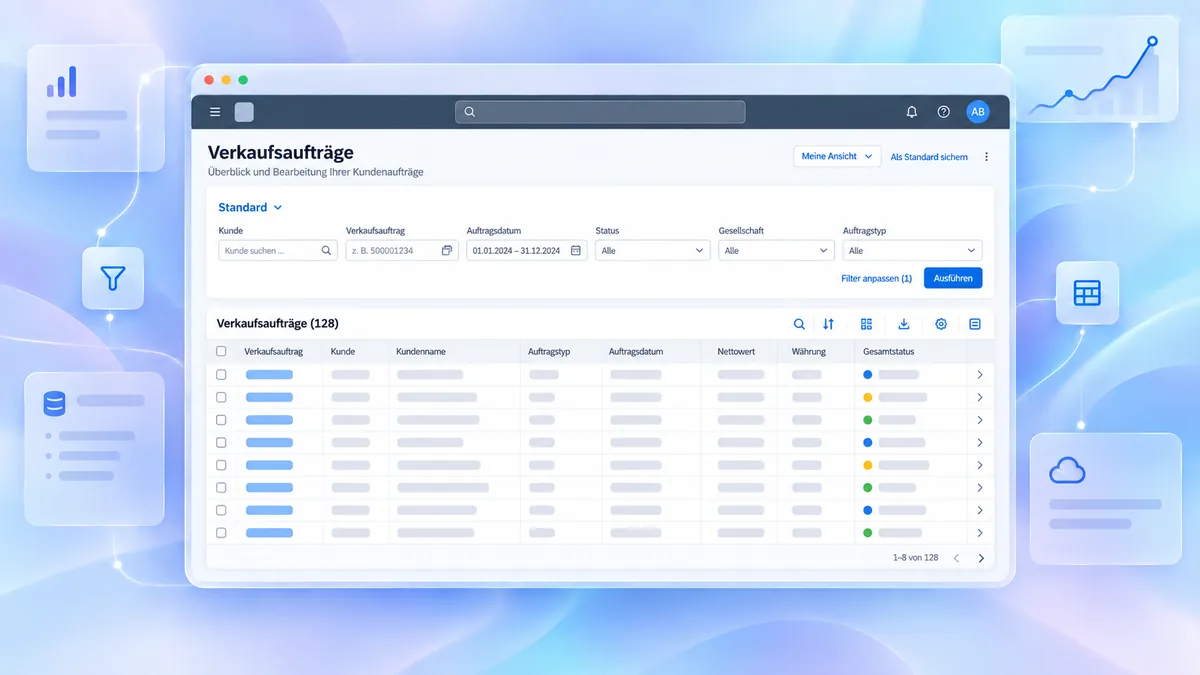
Once the right @UI annotations are set, SAP Fiori Elements automatically generates a complete List Report or Object Page app from them – table columns, filters, and sorting included, with no custom UI5 coding at all.
- Columns, filter bar, and facets from the view definition
- Consistent SAP Fiori look and feel with no custom frontend
- Changes to the data model take effect directly in the app
Two Paths
Key User Tool or ABAP Development?
SAP offers two tools of different depth for Custom CDS Views – which one fits depends on the use case.
Key User Tool "Custom Analyses"
In SAP S/4HANA Cloud, Public Edition, business users without ABAP knowledge can create their own analytical or transactional data models graphically.
- Graphical editor instead of source code
- Limited to released SAP standard views as a basis
- Suited to simple, business-focused evaluations
ABAP Development Tools (Eclipse)
Developers model Custom CDS Views as source text – with full access to associations, complex annotations, and the connection to RAP.
- Full control over SQL, annotations, and extensions
- Foundation for your own RAP business objects and complex apps
- Available in S/4HANA on-premise, Private Cloud, and Public Cloud
Frequently Asked Questions
FAQ on Custom CDS Views
Answers to the most important questions about custom data models in SAP S/4HANA.
A classic ABAP report contains procedural program logic and usually delivers a fixed output. A CDS View instead defines a reusable data model based on SQL and annotations – with no program logic of its own. This model can then be consumed by very different components: Fiori Elements, Analytics, OData services, or RAP business objects, rather than just a single report.
The Virtual Data Model is the entirety of the CDS Views SAP ships with S/4HANA – organized into basis views (close to individual database tables), composite views (linking several basis views via associations), and consumption views (for use by UI, analytics, or external services). Custom CDS Views typically build on composite or consumption views rather than accessing database tables directly.
No. A Custom CDS View is a standalone development object in the customer namespace that merely references SAP standard views or extends them with additional fields via "Extend View." The SAP standard code itself remains untouched – in line with SERKEM's principle of consistently working within the SAP standard and never building custom developments that would block later upgrades.
Both are possible. In SAP S/4HANA Cloud, Public Edition, key users can create simple data models graphically via the "Custom Analytical/Transactional Queries" app, without writing source code. For more complex modeling – deep association chains, custom annotations, connecting to RAP – the ABAP Development Tools and ABAP development knowledge are required.
RAP is SAP's current programming model for custom, transactional business objects in S/4HANA. It uses CDS Views as its data model layer and adds a behavior definition that specifies which actions (create, change, validate) are allowed on the data. Anyone building a custom transactional app on S/4HANA today can hardly avoid the interplay between CDS and RAP.
The most important annotation groups are: @UI controls how fields are displayed in Fiori Elements apps (columns, filters, facets). @Analytics marks a view for use in analytical evaluations and aggregations. @OData.publish exposes a view directly as an OData service, without having to define a separate service manually. Which combination makes sense depends on the intended consumer of the view.
Custom CDS Views modeled cleanly within the customer namespace are generally upgrade-safe, as long as they use referenced SAP standard views through official extension mechanisms ("Extend View," associations) rather than copying or modifying them. If SAP changes a referenced standard view structurally, that can still trigger adjustments to your own view – which is why reviewing your Custom CDS Views is part of every S/4HANA release change.
Ready for Your Own Data Model on the SAP Standard?
SERKEM models Custom CDS Views that build cleanly on the SAP standard – as a solid foundation for your Fiori apps, analyses, and interfaces.