



SAP Document AI: reading invoices, making knowledge queryable
SAP Document AI automatically extracts invoices, purchase orders, and bills of lading using pre-trained SAP standard models. For company-specific documents, we go a step further: we train custom extraction models and connect them to Generative AI Hub and SAP Joule — turning document knowledge into something you can query instead of something buried in a file share.








From paper invoice to a queryable knowledge source
SAP Document AI (formerly SAP Document Information Extraction) is part of the SAP Business AI portfolio and extracts structured data from documents using machine learning. For invoices, purchase orders, delivery notes, and bills of lading, SAP ships pre-trained models that recognize key fields without training and plug directly into SAP FI and MM — no manual data entry required.
For company-specific documents — supplier contracts, inspection certificates, technical data sheets, HR paperwork — there are no pre-trained standard models. This is where we go a step further: we train custom extraction models on SAP AI Core and connect the extracted content to Generative AI Hub for summarization and to SAP Joule for conversational access. A document archive becomes a queryable knowledge source.
Your starting point
What slows down document processing today
- Invoices, delivery notes, and purchase orders are still captured and checked manually
- Contracts, certificates, and specialist documents sit as PDFs in file shares, but nobody can search them in a targeted way
- Company-specific document types like inspection certificates or supplier contracts have no SAP standard model
- Extracted data lands in a spreadsheet, but nobody summarizes it or makes it accessible
- Different document formats and layouts make consistent processing difficult
- No connection between document extraction and the other Business AI building blocks
What SERKEM delivers
From extraction to a queryable knowledge source
- Automatic extraction from PDF, scan, and photo using SAP standard models for invoices, purchase orders, and bills of lading
- Custom extraction models for company-specific documents beyond invoices and purchase orders
- Validation against SAP master data and integration into SAP processes (FI/MM/SD)
- Connecting extracted content to the Generative AI Hub for summaries and analysis
- Conversational access to document content via SAP Joule instead of spreadsheet exports
- Model governance: versioning, accuracy monitoring, and a retraining process via SAP AI Launchpad
Every field with a confidence score
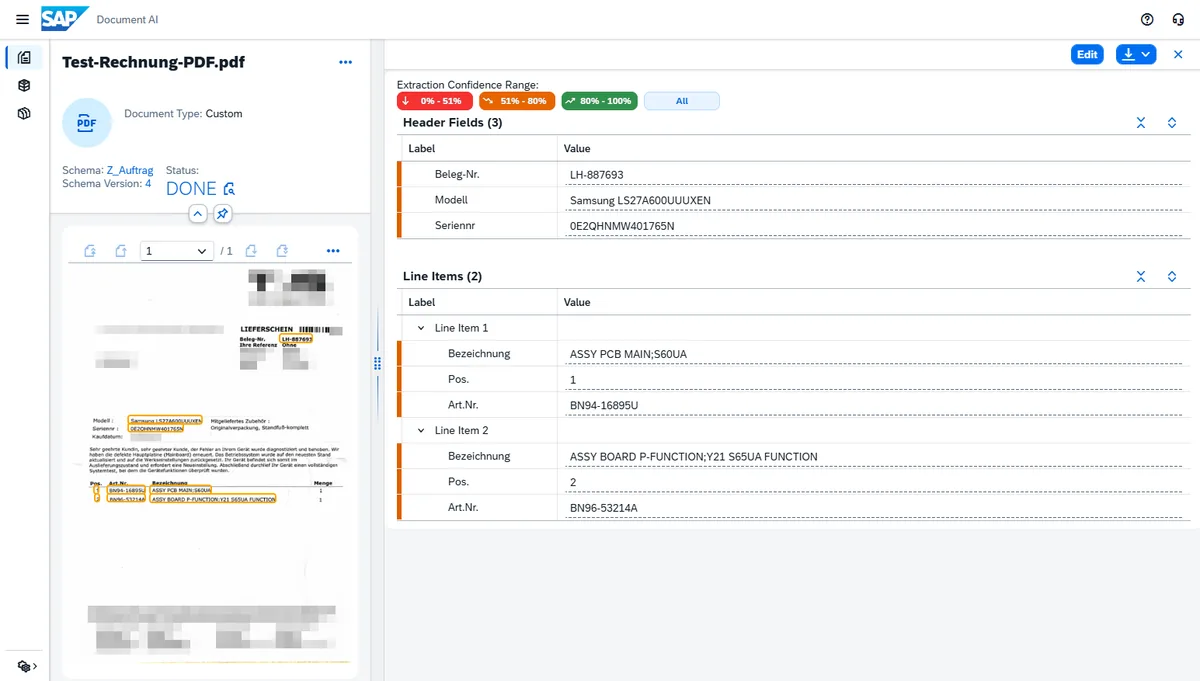
Whether standard model or custom-trained model: Document AI marks every extracted field with a confidence score. Values above the defined threshold are adopted automatically; lower values go to manual review — human-in-the-loop instead of blind trust in the extraction.
Validation cockpit
Extraction with confidence scores and human-in-the-loop
Document AI reads every field on an invoice — supplier, amount, tax rate, line items — and returns a confidence score per field. Fields with low confidence are flagged in the validation cockpit and can be corrected manually before posting, instead of re-capturing the entire document.
- Confidence score for every extracted field
- Manual correction only needed where confidence is low
- Corrections continuously improve the model
Click image to enlarge
Classic OCR vs. SAP Document AI
Text recognition is not the same as data extraction — the difference determines how much manual rework is left at the end.
Text recognition without context
Reads characters but doesn't recognize which field is an amount, a supplier number, or a date — fixed templates are needed per layout.
- Breaks on new layouts or suppliers
- No confidence score per field
- High maintenance effort for templates
SAP Document AI
Pre-trained and custom ML models recognize field semantics independent of layout — with a confidence score per field and native SAP integration.
- Works layout-independently, without templates
- Confidence score drives review needs
- Direct handoff to FI/MM processes or to Joule
Scope of services
The building blocks for custom document models
From training dataset to conversational query — what a productive custom Document AI setup includes.
Custom model training
Training custom extraction models on SAP AI Core for document types where no SAP standard model exists.
Training dataset & annotation
Building and annotating a training dataset from your real documents as the foundation for model quality.
Model governance in AI Launchpad
Versioning, release, and traceability of trained models, centralized in SAP AI Launchpad.
Accuracy monitoring & retraining
Ongoing monitoring of recognition rates and a defined retraining cycle whenever documents or layouts change.
Grounding in Generative AI Hub
Extracted content is summarized, categorized, and rendered in natural language via the Generative AI Hub.
Conversational access via Joule
Business teams query document content directly through SAP Joule instead of searching manually through file shares.
Model training
A custom model for documents no standard model recognizes
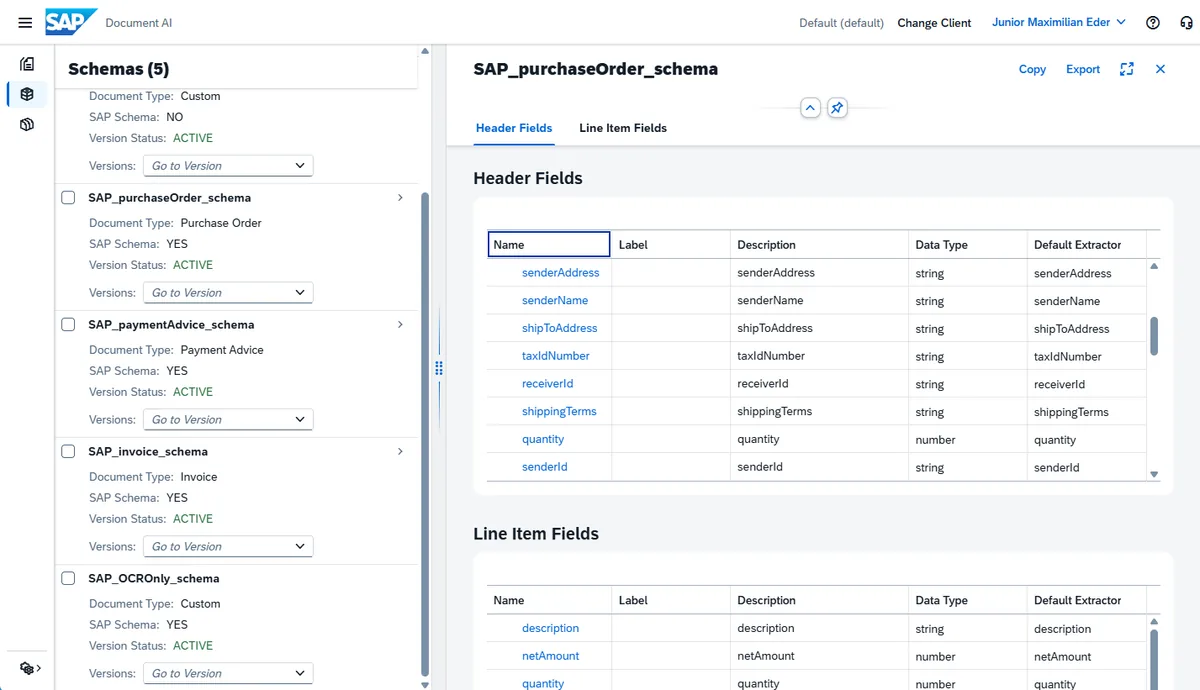
Inspection certificates, framework agreements, or technical data sheets rarely follow an SAP standard layout. Together with you, we build a training dataset from real documents, annotate the relevant fields, and train a custom extraction model on SAP AI Core — iteratively, until recognition quality is sufficient for production use.
- Selecting and cleaning up representative sample documents from your archive
- Annotating the relevant fields as the basis for model training
- Iterative training and validation on SAP AI Core
- Handover of the trained model, including documentation, to your team
Click image to enlarge
Governance
Keep models under control instead of letting them run unattended
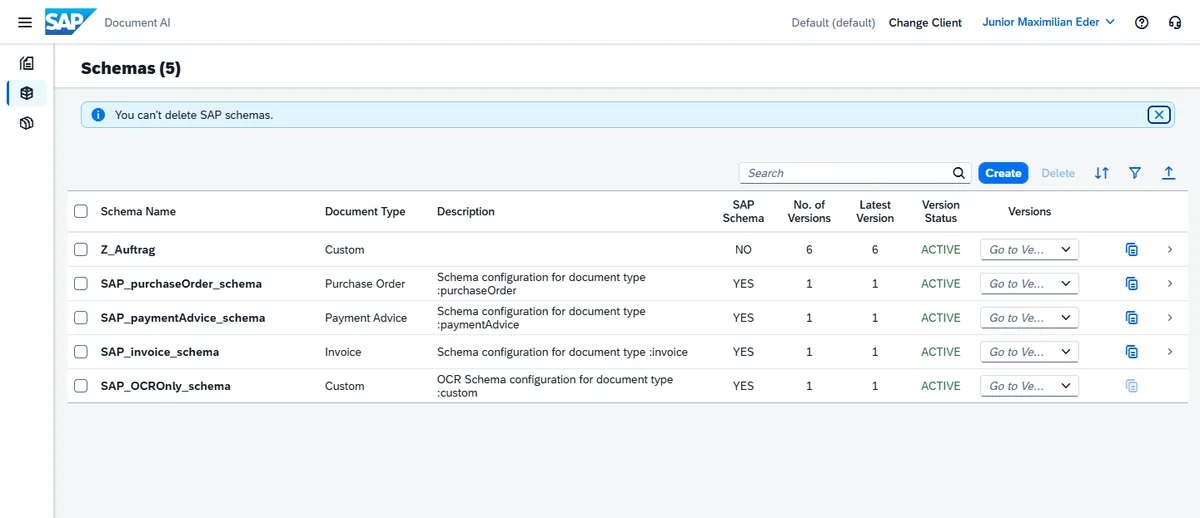
A trained model is not a one-off project. Layout changes at suppliers, new document variants, or seasonal patterns shift recognition quality over time. SAP AI Launchpad gives you a central view of model versions, recognition rates, and retraining needs — instead of running a black box.
- Central overview of all trained document models and their versions
- Monitoring recognition rates per document type over time
- Defined retraining process when model quality declines
- Traceable release of new model versions before production use
Click image to enlarge
From document analysis to production operation
Structured implementation — from surveying your document types to ongoing SAP integration.
SAP Document AI in action
From automatic invoice capture to self-learning document classification — real-world scenarios from projects.
Automatic invoice capture in SAP FI
Incoming invoices are read by Document AI and posted directly as accounting documents in SAP FI — no manual data entry, with automatic validation against the supplier master.
Matching against SAP purchase orders
Extracted invoice data is automatically matched against open purchase orders — quantities, prices, and suppliers are checked, discrepancies are escalated.
Bill of lading recognition and goods receipt posting
Delivery notes and bills of lading are read automatically and posted as a goods receipt document in SAP MM — for faster throughput times at goods receipt.
Automatic document classification
Incoming documents are automatically classified (invoice, delivery note, contract) and routed to the right archiving process — no manual sorting required.
Complete audit documentation
Every extraction run is logged — which document, which fields were recognized, which were corrected manually. A complete audit trail for GoBD compliance and external audits.
Querying contract terms via Joule
Instead of an Excel filter: "Which supplier contracts expire in the next three months?" — answered conversationally, grounded in the actual documents.
Application areas
Where custom document models make the difference
SAP standard models cover invoices and purchase orders. Documents without an SAP standard schema need custom extraction models.
Human Resources
Capture employment contracts, references, and onboarding documents in structured form instead of manually searching personnel files.
Procurement & Legal
Make supplier contracts and framework agreements searchable by term, conditions, and clauses.
Quality & Compliance
Capture inspection certificates and conformity declarations automatically and track deadlines reliably.
Engineering & Development
Make technical data sheets and specifications searchable in structured form instead of digging through PDF folders.
Why companies choose SERKEM
SAP process knowledge and BTP development expertise — for Document AI that truly fits your workflows.
Combined expertise in SAP FI/MM and BTP development
Document AI only delivers value once it's integrated with SAP. SERKEM combines extraction expertise with a deep understanding of the SAP FI and MM processes the data feeds into.
Experience across document types and industries
From industrial invoices to supplier contracts and inspection certificates — SERKEM has implemented document processing across a range of industries and knows the typical layout challenges.
Exception handling and manual rework processes included
No model recognizes 100% of documents flawlessly. SERKEM implements robust fallback processes for incompletely recognized documents — with a defined escalation path and user interface.
Integration into existing SAP processes without breaking the chain
Document AI is not a standalone solution — SERKEM integrates it into existing SAP workflow, approval, and archiving processes, so no new media breaks are introduced.
Rapid prototyping instead of concept papers
Custom document models follow the same approach as every SERKEM project: you see a working model on your priority document types early on — and can course-correct before it gets expensive.
Consistently within the SAP standard
We set up model training, governance, and integration exclusively within the SAP standard — no workarounds that would block future updates.
News, real-world insights, and perspectives from our SAP experts. (German-language articles)




Frequently asked questions
FAQ on SAP Document AI
The most important questions on standard extraction, custom document models, and the connection to Business AI.
SAP Document AI includes pre-trained models for incoming invoices, purchase orders, delivery notes, bills of lading, and payment advices. These standard models recognize the most common fields (invoice number, amount, supplier, date, etc.) without any training. For company-specific document types without an SAP standard schema — such as supplier contracts, inspection certificates, or technical data sheets — we train custom models.
Recognition accuracy for the pre-trained models is typically above 95% on well-structured documents (digital PDFs). For scanned documents, complex layouts, or custom-trained models, results can vary. SERKEM checks recognition rates during the upfront assessment against your actual documents and configures thresholds for automatic vs. manual processing accordingly.
Whenever no SAP standard model exists, or existing models don't reliably recognize the relevant fields — for example, with supplier contracts, inspection certificates, technical data sheets, or industry-specific forms. For invoices, purchase orders, and delivery notes, the SAP standard models are usually the faster and more robust choice. Training a custom model typically requires 50–100 annotated sample documents for good recognition quality.
Document AI extracts structured fields from documents. The Generative AI Hub contextualizes and summarizes this content, grounded in the actual documents. SAP Joule makes the results conversationally accessible to end users. Only together do these three building blocks turn an extraction into a usable knowledge source.
Integration happens via the SAP Document AI API on BTP. Typically, an iFlow is built in SAP Integration Suite that passes incoming documents to Document AI, enriches the extracted data, and transfers it into SAP FI via BAPI or IDoc. SERKEM implements this integration flow end to end — including error handling and a manual correction step for uncertain extractions.
SERKEM implements a configurable confidence threshold: if the recognition confidence of individual fields falls below this value, the document is routed to a manual review queue. Staff can check and correct the extracted fields before the document is passed on to SAP. These corrections can optionally be used to improve the model.
Yes. We recommend starting with a clearly scoped, prioritized document type — building a first working prototype following a rapid-prototyping approach and validating recognition quality with real examples before adding further document types.
Implement SAP Document AI — from invoices to your own model
Schedule a short initial consultation: we'll assess which documents can be automated with SAP standard models, which ones warrant a custom model — and how the results can meaningfully connect with Generative AI Hub and SAP Joule.