



SAP Mobile Services
SAP Mobile Services is the BTP service for mobile app infrastructure: push notifications, offline OData synchronization, app security, and device management – as a backend for native iOS, Android, and cross-platform apps.








Mobile apps need more than an API endpoint
SAP Mobile Services provides the entire mobile app infrastructure: OAuth2/SAML-based authentication, an OData offline store with delta sync and conflict resolution, push notification routing to APNs and FCM, app security features such as certificate pinning, jailbreak detection and data vault – plus backend analytics.
Without this infrastructure, every app has to solve the same problems on its own: its own OAuth backend, its own push infrastructure, its own offline sync. SAP Mobile Services solves this centrally – configurable per app, auditable, and embedded in the SAP BTP security architecture.
Your requirements
What mobile SAP projects need today
- App authentication against SAP without a custom OAuth backend
- The mobile app needs to work offline (warehouse without Wi-Fi)
- Push notifications from SAP workflows to mobile users
- Security policies: jailbreak detection and data encryption
- MDM integration for company-wide app configuration
Our solution
What SERKEM delivers
- App registration and connectivity setup in the Mobile Services cockpit
- OData offline store configuration (entity sets, delta sync, conflict resolution)
- Push provider setup (APNs + FCM) including test delivery
- Security policy configuration (certificate pinning, data vault, jailbreak detection)
- MDM managed app config for company-wide rollout
What happens when the connection drops?
Records are stored locally and automatically reconciled with the backend once the connection returns – with no data loss.
What SAP Mobile Services provides
Six core services form the complete backend infrastructure for enterprise-grade mobile apps.
App Connectivity & OAuth2
Mobile Services acts as a proxy to SAP backends (S/4HANA, ECC). The OAuth2 SAML Bearer Assertion Flow enables single sign-on without separate app credentials. SAP IAS is supported as a corporate identity provider – users authenticate once against the company directory.
OData Offline Store
A database-backed offline store inside the app (SQLite). Automatic delta synchronization via change data capture and a delta-token-based sync protocol. Conflict resolution configurable per entity set: client wins, server wins, or a custom merge strategy.
Push Notifications (APNs + FCM)
Routes SAP backend events to Apple Push Notification Service (APNs) and Google Firebase Cloud Messaging (FCM). Retry logic, JSON payload templates, badge-count management, and silent push for background sync triggers with no user interaction.
App Security
Certificate pinning protects against man-in-the-middle attacks. Jailbreak and root detection: the app shuts itself down on compromised devices. Data Vault encrypts local data with AES-256. Policy-based screen-lock requirements enforce device protection.
MDM/EMM Integration
Connects to mobile device management systems (Microsoft Intune, Jamf, SOTI, VMware Workspace ONE). Managed App Config enables company-wide configuration with no user interaction. Certificate deployment via MDM for certificate-based app authentication.
Mobile Analytics & Logging
Symbolicated crash reporting for iOS and Android, API response time tracking, session analytics, and usage funnel analysis. Logs can be forwarded to the SAP Audit Log service or to external SIEM systems.
Mobile Services in detail
Cockpit and push working together
App registration and connection management in the cockpit
Every mobile app is registered as an application in the Mobile Services cockpit. Each app maintains its own connectivity configuration (backend endpoints), push provider, security policies, and analytics settings. The cockpit shows active connections, recent API calls, and push delivery statistics in real time.
- App registration with client ID and client secret
- Multiple backend connections configurable per app
- Connection status and response times per endpoint in real time
- Role- and group-based access control per app
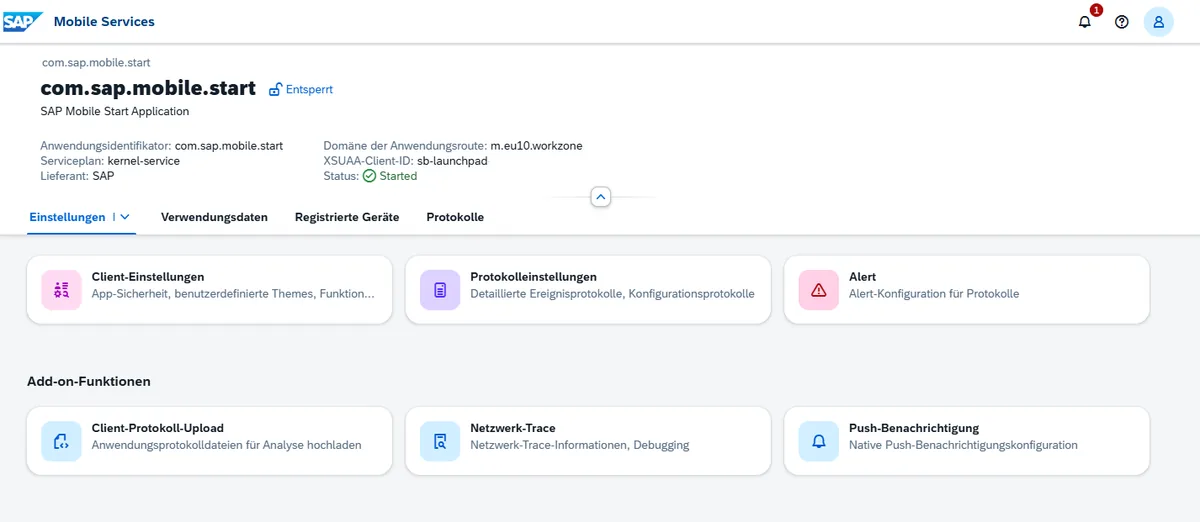
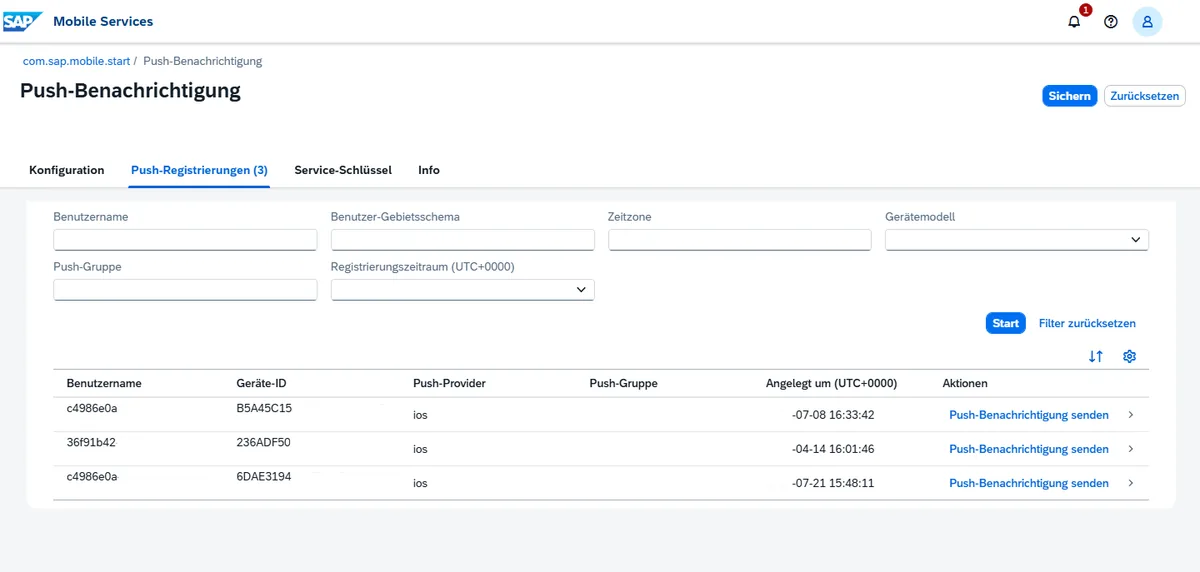
Push infrastructure: APNs and FCM configured centrally
Mobile Services routes push notifications to Apple Push Notification Service (APNs) and Google Firebase Cloud Messaging (FCM). The SAP backend sends a single API request to Mobile Services; the service handles platform-specific authentication, retry logic, and delivery tracking. APNs certificates and FCM API keys are stored in the cockpit.
- APNs: P8 certificate (key-based) or P12 certificate (legacy)
- FCM: server key or HTTP v1 API with an OAuth2 service account
- Delivery status per device: delivered / failed / pending
- Silent push for background OData sync with no user interaction
Native app, MDK, or cross-platform: what fits?
SAP Mobile Services is the common backend denominator – regardless of the frontend approach.
SAP Mobile Development Kit (MDK)
SAP's own framework: one codebase for iOS, Android, and web. Metadata-driven, no native code required.
- Fastest development for standard CRUD apps
- Fiori-compliant design with no design effort
- Limited UI freedom for complex layouts
- Ideal for: approvals, simple stock inquiries
Native iOS / Android
Swift/Kotlin with the SAP Mobile Services SDK. Maximum performance and UI freedom for complex use cases.
- Full access to platform APIs (camera, barcode, Bluetooth)
- Offline store and push natively integrated via SDK
- Highest development effort of the three approaches
- Ideal for: complex warehouse processes, scanner-heavy apps
React Native / Flutter
Non-SAP frameworks using the Mobile Services REST API. Flexible, but more integration work falls on the team.
- Mobile Services can be connected via the REST API
- No ready-made SDK components available
- Reliant on the community for SAP-specific solutions
- Ideal for: teams with existing RN/Flutter experience
From analysis to a live rollout
Setting up Mobile Services is craftwork – getting the entity sets, security policies, and push configuration right decides whether the project succeeds.
App requirements analysis
Capture use cases, offline requirements, push scenarios, and security policies. Decide: MDK, native, or cross-platform. List backend endpoints and OData services.
Mobile Services setup
Register the app in the cockpit, configure backend connections, set up the OAuth2 flow, add push providers, define offline store entity sets, and activate security policies.
Test & rollout
End-to-end testing of all Mobile Services functions (push, offline sync, auth), configure MDM managed config, pilot rollout to one user group, activate monitoring.
SAP Mobile Services in real-world processes
From the warehouse floor to the field – these scenarios show which Mobile Services features come into play.
Goods receipt without Wi-Fi
The app scans pallet labels and posts goods receipts to SAP EWM – even without a network connection. The OData offline store buffers every posting and syncs at the next Wi-Fi contact.
Field technicians with offline checklists
A technician opens a service order from S/4HANA offline in the field, fills out a checklist, and logs time – all stored locally, synced at the next 4G signal.
Push-triggered approval workflows
An SAP workflow sends a push to the manager: "New order awaiting approval." Tapping the notification opens the approval screen directly in the app.
QM inspections with photo documentation
The QM app uses the native camera (only reachable via native/cross-platform) for photo documentation. Images go with the inspection record via OData to S/4HANA.
Mobile time tracking with geofencing
The app records working time at the tap of a button and validates the location via GPS geofencing. Push reminder for a missing check-out at the end of the shift.
Inventory counts with a barcode scanner
The native app uses a built-in barcode library (ZXing/AVFoundation) for fast scanning. Count data is buffered offline and bulk-synced after the count.
What SERKEM brings to your Mobile Services project
Setting up mobile app infrastructure the right way takes more than cockpit know-how – it takes experience with the pitfalls.
Mobile Services and app development from one hand
SERKEM has both the Mobile Services backend and SAP MDK plus native app development in its portfolio. No interface problem between backend and frontend teams.
SAP SDK expertise from real projects
The SAP Mobile Services SDKs for iOS and Android are complex. SERKEM knows the pitfalls of OAuth2 SAML Bearer, offline store delta sync, and certificate pinning from live projects.
Security from the start
App security isn't bolted on afterwards. SERKEM configures certificate pinning, Data Vault, and MDM policies as part of the initial setup – not after the first penetration test.
Full operations available
After go-live, SERKEM can transition Mobile Services and the associated BTP infrastructure into an AMS model – for ongoing operations, maintenance, and new features.
News, real-world insights, and perspectives from our SAP experts. (German-language articles)
APIs im Griff: API-Management der Integration Suite
PI/PO läuft 2027 aus: der Weg zur Integration Suite
Build Work Zone: Launchpad ablösen — oder besser nicht?
Eine Datengrundlage für alles: SAP Business Data Cloud
Apps bauen, ohne den Kern zu berühren: SAP Build
Technical questions about SAP Mobile Services
Officially, SAP Mobile Services supports native apps built with the SAP BTP SDK for iOS (Swift) and Android (Kotlin/Java), as well as apps based on the SAP Mobile Development Kit (MDK). React Native and Flutter can connect via the Mobile Services REST API, but have no ready-made SDK support – that requires custom integration.
A regular local database requires you to implement your own sync logic, delta tracking, and conflict resolution. The OData offline store handles all of that: a delta-token-based protocol, server-side change tracking, and configurable conflict strategies. To the app, the store behaves like a normal OData service – just local, and without a network.
Yes, via the Mobile Services REST API. Push notifications, app registration, and the connectivity proxy are REST-based and therefore usable regardless of framework. The OData offline store, however, is tightly bound to the native SDK – for RN/Flutter, the offline logic has to be solved differently. SERKEM advises on the most sensible architecture for your requirements.
No. Mobile Services implements the OAuth2 SAML Bearer Assertion Flow: the user authenticates against the corporate identity provider (SAP IAS, Azure AD, etc.), receives an OAuth2 token, and the app communicates with Mobile Services using that token – without ever transmitting SAP passwords. The backend system verifies identity via SAML assertions.
It depends on the configured conflict resolution strategy. "Client wins" overwrites the server state with the local value. "Server wins" discards the local change. For complex scenarios, a custom conflict handler can be implemented that compares both versions and makes a business-driven merge decision. The strategy is configured per entity set.
SAP Mobile Services supports the AppConfig Community Specification, implemented by all common MDM/EMM systems: Microsoft Intune, Jamf Pro, VMware Workspace ONE, SOTI MobiControl, and others. Configuration values (server URLs, tenant IDs, feature flags) are delivered to the app via MDM, with nothing for users to enter.
Build your mobile app infrastructure
From app registration to the offline store – SERKEM sets up SAP Mobile Services and supports the entire mobile app development journey.