



SAP Business Application Studio – Cloud IDE for SAP
SAP Business Application Studio (BAS) is the web-based development environment for ABAP Cloud, CAP, and Fiori on SAP BTP. SERKEM supports development teams with setup, Dev Spaces, and building productive development workflows.








Develop without local installation
SAP Business Application Studio replaces the local SAP Web IDE and is now the central tool for SAP development in the cloud. Developers work in predefined Dev Spaces, preconfigured for the task at hand – ABAP, CAP, SAP Fiori, or mobile.
BAS integrates SAP Joule for AI-assisted code completion, supports GitHub repositories, and connects seamlessly to CI/CD pipelines. SERKEM sets up BAS, configures Dev Spaces, and enables your teams for productive cloud development.
Your requirements
What SAP development teams need today
- The local SAP Web IDE is too complex to maintain
- Developers need consistent, preconfigured development environments
- No integration with CI/CD and Git yet
- Developing ABAP Cloud and CAP in parallel
- Remote development without VPN
Our solution
What SERKEM delivers
- BAS setup and subaccount configuration
- Preconfigured Dev Spaces per development type
- Git integration and CI/CD connectivity
- Activating and using Joule AI features
- Training and onboarding for development teams
One Dev Space per development scenario
Each Dev Space type comes with its own tooling – matched to the language and target architecture.
" ABAP Cloud Dev Space – Steampunk toolchain
CLASS zcl_sales_order DEFINITION PUBLIC.
  METHODS get_total
    RETURNING VALUE(result) TYPE p.
ENDCLASS.
// CAP Dev Space – Node.js & CDS tooling
entity Orders {
  key ID    : UUID;
  customer  : String;
  total     : Decimal(10,2);
}
// Fiori Dev Space – UI5 tooling & Page Editor
sap.ui.define(["sap/ui/core/mvc/Controller"], function (Controller) {
  return Controller.extend("app.controller.Main", {});
});
# Full-Stack Dev Space – multi-runtime support
services:
  - name: orders-srv
    type: nodejs
  - name: orders-ui
    type: html5
Preconfigured workspaces instead of manual setup
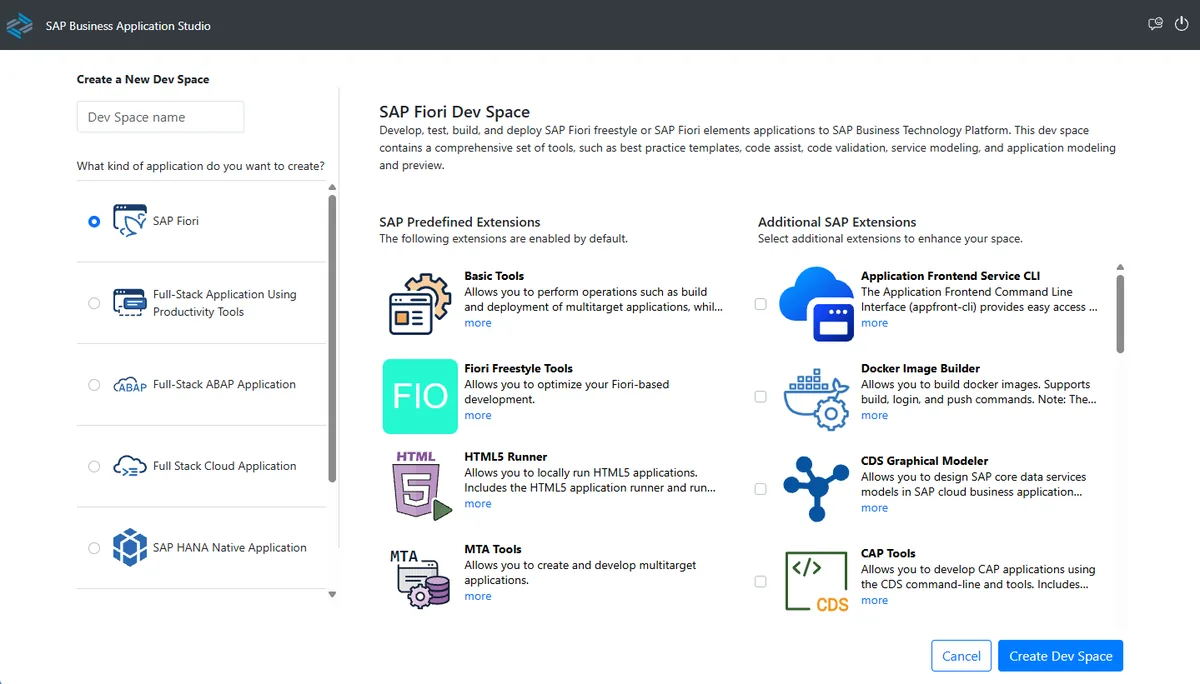
A Dev Space is an isolated, browser-based development environment with preinstalled extensions, runtimes, and tools for the chosen application type – e.g. "Full Stack Cloud Application" for CAP or "ABAP Cloud Development Tools" for ABAP Cloud. Developers get started directly in the browser, with no local tool installation.
- Predefined Dev Space types for every use case
- Start/stop on demand, no permanent compute commitment
- Git integration and a direct BTP deployment pipeline
Local IDE vs. Business Application Studio
Both paths lead to working code – the difference lies in setup effort, team consistency, and proximity to the BTP runtime environment.
Eclipse / VS Code locally
Full control over the local environment, but every developer maintains their own tooling, extensions, and access.
- Individual setup per developer machine
- VPN access to SAP backend systems required
- Version drift between team members possible
SAP Business Application Studio
Consistent, browser-based Dev Spaces – connected directly to SAP BTP.
- Identical setup for the whole team
- No VPN needed, browser-based access
- Direct deployment pipeline to SAP BTP
From initial configuration to a productive development workflow
BAS is up and running, Dev Spaces are configured, Git and CI/CD are connected – your team develops productively from day one.
Development scenarios with SAP BAS
BAS covers every modern SAP development scenario – from ABAP Cloud to CAP to AI-assisted development with Joule.
ABAP Cloud extensions for S/4HANA
ABAP Cloud development directly in the browser – no local ABAP Development Tools stack required, full integration with S/4HANA Cloud and on-premise (PCE).
SAP CAP full-stack app on BTP
Node.js- and Java-based CAP applications are developed in the CAP Dev Space – with an integrated OData service designer, CDS syntax support, and direct deployment to CF or Kyma.
Fiori Elements app with OData V4
Fiori apps are built with the integrated Yeoman generator and Fiori Application Modeler in BAS – with live preview and direct deployment to the SAP backend.
SAP MDK app development
Mobile Development Kit apps for iOS and Android are built in the BAS MDK Dev Space – with a UI builder, OData connectivity, and direct deployment via Mobile Services.
Consistent development environment for global teams
International development teams work with identically configured Dev Spaces – no local installation differences, a consistent developer experience worldwide.
Code completion and review with SAP Joule
SAP Joule generates code snippets, suggests refactorings, and explains existing code – directly in BAS, with no external tools or plugins.
Why companies choose SERKEM
Hands-on experience in ABAP, CAP, and Fiori – combined with full DevOps integration and proven Dev Space templates for a fast start.
Hands-on experience with ABAP, CAP, and Fiori in BAS
SERKEM has deployed BAS in production projects for all three development types – not theoretical recommendations, but proven configurations from real practice.
Full CI/CD integration from day one
Git workflows and CI/CD pipelines are set up from the start of the project – no retrofitting, no manual deployment steps.
Joule AI features used deliberately
SERKEM knows the strengths and limits of SAP Joule in BAS and shows development teams exactly where AI support saves real time – and where caution is warranted.
Fast start with proven Dev Space templates
SERKEM delivers preconfigured Dev Space templates that developers can use productively right away – no lengthy configuration and trial-and-error.
News, real-world insights, and perspectives from our SAP experts. (German-language articles)

APIs im Griff: API-Management der Integration Suite

PI/PO läuft 2027 aus: der Weg zur Integration Suite
Build Work Zone: Launchpad ablösen — oder besser nicht?

Eine Datengrundlage für alles: SAP Business Data Cloud

Apps bauen, ohne den Kern zu berühren: SAP Build
Frequently asked questions about SAP Business Application Studio
SAP Business Application Studio fully replaces the SAP Web IDE. The Web IDE is no longer being developed further and is no longer available to SAP BTP customers. BAS is built on the Open VSX ecosystem (VS Code-compatible), offers preconfigured Dev Spaces instead of one monolithic environment, and natively supports modern Git workflows as well as CI/CD integration.
BAS offers preconfigured Dev Spaces for: SAP CAP (Node.js and Java), ABAP Cloud, SAP Fiori Elements, SAP Mobile (MDK and SAPUI5), SAP Integration Suite, and full-stack application development. Custom Dev Spaces with individual extensions can also be configured.
BAS includes native Git integration that works directly in the browser. Developers can clone repositories, create branches, make commits, and open pull requests – all without a local Git installation. GitHub, GitLab, Bitbucket, and Azure DevOps repos are supported.
BAS supports ABAP Cloud development for S/4HANA Cloud Public Edition, Private Cloud Edition (PCE), and S/4HANA on-premise from release 2022 onward. For classic ABAP on-premise development (pre-2022), ABAP Development Tools in Eclipse is still recommended. SERKEM advises on the right setup depending on your system release.
SAP Joule in BAS offers code completion for ABAP, CAP, and Fiori, natural-language code generation from descriptions, code explanations for existing code, and automated unit test generation. Capabilities are continuously expanding – the current scope depends on the BAS release and the BTP entitlements activated.
Setting up SAP Business Application Studio – we support your team
From initial configuration to a productive development workflow: SERKEM gets BAS up and running.