



SAP BTP Budget Monitoring
SAP BTP bills services based on consumption — without cost transparency, a single subaccount or service can blow through your budget. SERKEM sets up budget alerts, budget groups, and cost reports before it gets expensive.








From Consumption Blindness to Controlled BTP Usage
SAP BTP bills services based on consumption — depending on your contract model, either through the Cloud Credit Economy (CPEA/BTPEA) or Pay-As-You-Go (PAYG). Every service has specific Metric Type Entities (MTEs) that measure usage: Integration Suite counts iFlow executions, Work Zone Advanced Edition counts active users, Document AI counts pages processed. Billing is tracked at the Global Account → Directory → Subaccount level.
Without active budget monitoring, a cost overrun goes unnoticed until the monthly invoice arrives. Especially in landscapes with multiple subaccounts, parallel projects, and a growing BTP service portfolio, preventive monitoring isn't a nice-to-have — it's an operational necessity.
Typical Requirements
- No overview of BTP costs at the department level
- Credits run out unexpectedly, with no advance warning
- Subaccounts turn into "cost black holes"
- Finance demands monthly cost reports per cost center
- Alerts arrive too late — only once the limit is already exceeded
SERKEM Delivers
- Budget configuration for all relevant subaccounts and services
- ANS setup with an escalation chain (80% / 95% / 100%)
- Budget groups structured by cost center or project
- Cost-report template for Finance — CSV-ready
- Monthly budget review including forecast
What SAP BTP Budget Monitoring Delivers
SERKEM configures every relevant monitoring component — from threshold alerts to Finance-ready usage reports.
Budget Alerts
Threshold-based warnings (e.g. 80% of budget consumed) at the service, subaccount, or global account level. Configurable directly in the BTP cockpit, or via the Alert Notification Service (ANS) for advanced routing options.
Budget Groups
Logical clustering of BTP services by cost center or project. Multiple subaccounts can be assigned to a budget group to reflect cross-departmental cost ownership.
Alert Notification Service (ANS)
SAP's native notification service for all BTP events. Conditions define alert triggers based on service name, MTE type, and threshold. Actions route messages to email, Slack webhooks, or HTTP endpoints.
Cost Reports
Detailed breakdown of BTP usage by service, MTE type, and period. Exportable as CSV for Finance teams and ready for further processing in SAP Analytics Cloud or SAP FI/CO.
Forecast & Trend Analysis
Projects the current consumption curve forward to the end of the billing month. Early warning of a budget overrun based on the usage trend to date — before the threshold is actually crossed.
MTE-Based Monitoring
Every BTP service has its own specific Metric Type Entities (e.g. "Integration Suite – Integration Flow Messages", "Work Zone – Active Users"). SERKEM identifies the relevant MTEs and configures targeted alerts per service.
Budget Overview: From Global Account to Subaccount
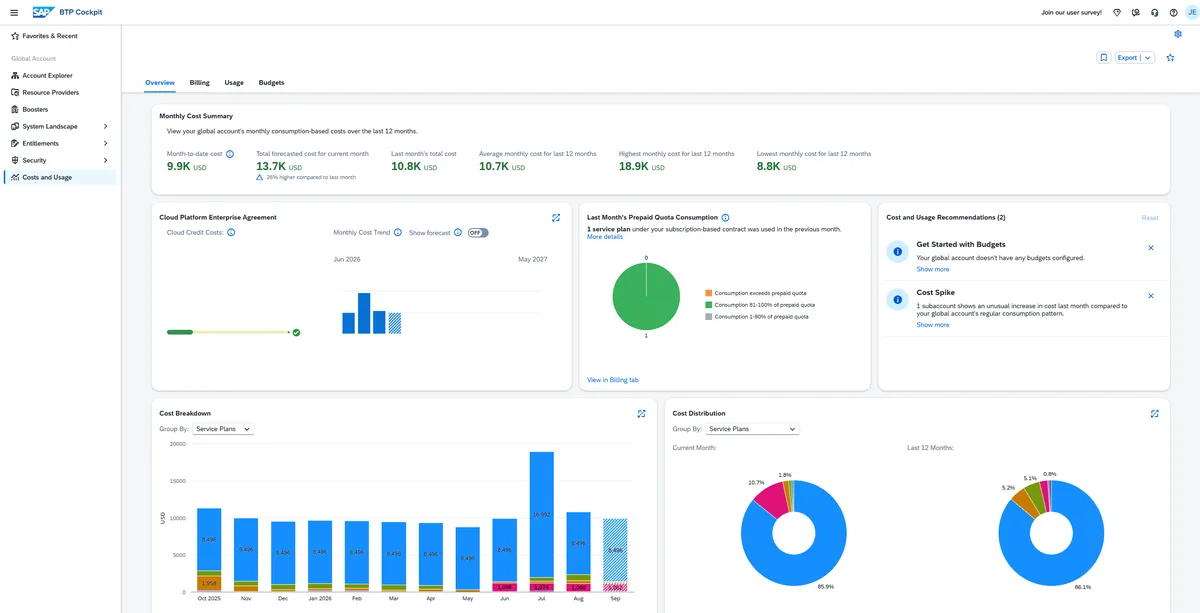
The BTP cockpit maps the budget hierarchy across three levels: the global account contains directories, and subaccounts sit beneath those. Budget limits are configured separately at each level. Usage bars show the percentage of the configured budget consumed in real time — color-coded by utilization: green under 60%, yellow between 60% and 80%, red above 80%.
- Subaccount hierarchy visible at a glance
- Drill down with a click on any directory or subaccount
- Plan vs. actual comparison for the current month
- Download function for Finance integration
Configuring Alerts: Conditions, Channels, Recipients
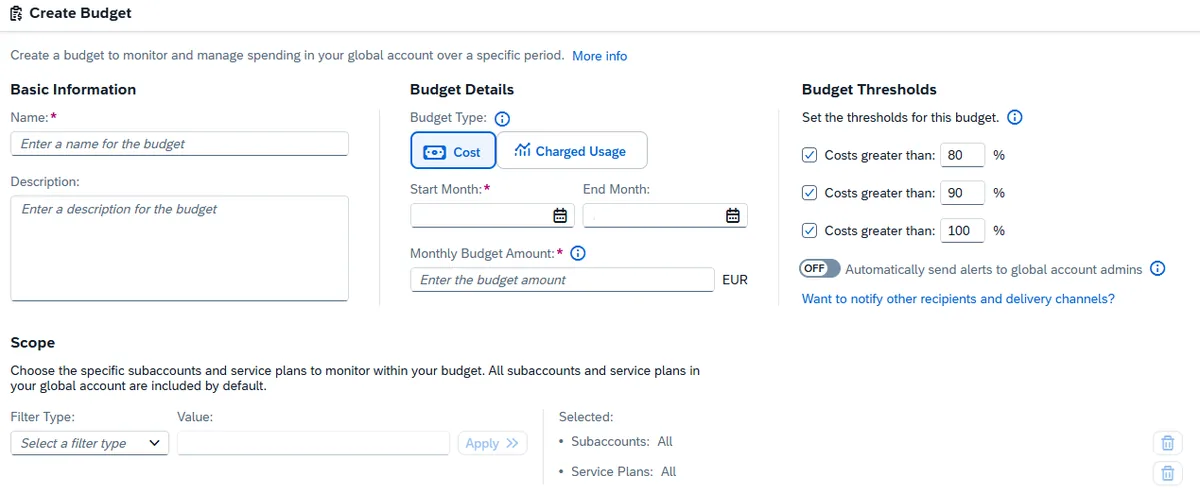
The Alert Notification Service (ANS) is the central notification service for all BTP events. Conditions combine service name, MTE type, and threshold (e.g. "> 80% of a budget limit"). Actions route notifications to email, Slack webhooks, Microsoft Teams, or generic HTTP endpoints. A subscription links a condition to an action and activates the routing.
- Multiple conditions configurable per service
- Notify email and Slack in parallel from a single action
- Escalation chain: 80% → info, 95% → critical
- Acknowledgment function for resolved alerts
Usage Reports: Transparency Down to the Service Level
BTP cost reports break down total usage by service, MTE type, directory, and period. Costs are shown in BTP units (credits) and, depending on the licensing model, in euros. Reports can be exported to match Finance requirements (CSV) and further processed in SAP Analytics Cloud or fed directly into SAP FI/CO processes.
- Filter by subaccount, service, period, and MTE
- Current month vs. previous month comparison
- Trend visualization (sparkline) per service
- CSV export for ERP integration and Finance teams
SAP BTP Billing: Three Models Compared
The billing model determines how critical budget monitoring is. SERKEM advises on the licensing decision and sets up monitoring to match.
PAYG (Pay-As-You-Go)
Usage-based with no upfront commitment. Every service call is billed directly — with no cost buffer.
- No minimum commitment
- Highest cost risk without monitoring
- Ideal for evaluation and test phases
- Budget can spike quickly with unchecked growth
BTPEA / Cloud Credits
Prepaid credits for BTP services. A clearly defined budget that SERKEM monitors end-to-end and keeps transparent.
- Upfront commitment defines a hard budget ceiling
- Credits expire at contract end
- Monitoring shows remaining credits in real time
- Can be topped up with an additional purchase
Subscription
Monthly flat rate for specific services. Low cost risk, but service limits still need to be actively monitored.
- Fixed monthly cost
- Overage = PAYG top-up charge
- Monitoring warns before limits are reached
- Typical for Integration Suite and Work Zone
Three Steps to Ongoing Budget Monitoring
SERKEM structures monitoring from the ground up — matched to your BTP architecture, licensing model, and Finance requirements.
Inventory & Analysis
Capture all BTP subaccounts, services, and current usage patterns. Review the licensing model (PAYG / CPEA / subscription). Identify and prioritize the relevant MTEs for each service in use.
Configuration
Set budget limits, create budget groups, configure ANS conditions and actions (thresholds at 80% / 95% / 100%), and set up and test notification channels (email, Slack, Teams).
Reporting & Handover
Create a cost-report template, brief the Finance team, and define a monthly review meeting. Document the escalation process and hand it over as a runbook — for sustainable operation without depending on SERKEM.
Budget Monitoring in Practice
From individual BTP services to complex multi-subaccount landscapes — SERKEM knows the typical cost risks on BTP.
Budgeting Integration Traffic
Integration Suite bills by message count (iFlow executions). Without an alert, high-volume test integrations can consume the monthly budget before production traffic is even accounted for.
Monitoring the Active-User Limit
Work Zone Advanced Edition bills by active users per month. An alert at 90% of the limit gives you time to expand licenses or deactivate inactive users — before extra charges apply.
Monthly Budget Report by Cost Center
Budget groups map to internal cost centers. The monthly cost report shows each cost center's usage, trend, and remaining budget — as a CSV export ready for direct use in SAP FI/CO.
Controlling Document Volume
Document AI bills per page processed. High-volume batch runs can unnoticeably consume large amounts. SERKEM sets an alert at 70% of the monthly volume, before buffer credits run out.
Budgeting Dev/QA/Prod Separately
Separate budget limits for development, QA, and production subaccounts. Dev budgets are set tightly; the production budget is generous with monitoring at 85% — so productivity isn't hurt by unexpected limits.
Combining BTP Monitoring and Budget
SAP Cloud ALM adds the cost perspective on top of technical monitoring (health, availability). SERKEM connects both layers in a single, unified BTP operations concept — technical and financial control from one source.
What Sets SERKEM Apart in BTP Budget Monitoring
Budget monitoring is technically accessible — but only effective when it matches your BTP architecture, licensing model, and Finance requirements.
BTP Depth Across All Services
Budget monitoring isn't trivial, because every BTP service has different MTEs. SERKEM knows the relevant metrics for Integration Suite, Work Zone, Document AI, IAS, and every other service in use — with no lengthy ramp-up.
ANS Expertise
The Alert Notification Service is powerful but configuration-intensive. SERKEM has set up ANS on many BTP projects and knows every pitfall around condition setup, action routing, and subscription management.
A Bridge to Finance
Cost reports need to be Finance-ready. SERKEM builds templates that plug directly into SAP FI/CO processes — with correct cost-center allocation, monthly accrual periods, and CSV format for ERP import.
Preventive, Not Reactive
The goal is that budget problems never reach the Finance team, but are caught beforehand by the BTP team. SERKEM sets thresholds early enough and defines clear escalation paths for every trigger.
News, real-world insights, and perspectives from our SAP experts. (German-language articles)

APIs im Griff: API-Management der Integration Suite
PI/PO läuft 2027 aus: der Weg zur Integration Suite

Build Work Zone: Launchpad ablösen — oder besser nicht?

Eine Datengrundlage für alles: SAP Business Data Cloud

Apps bauen, ohne den Kern zu berühren: SAP Build
Frequently Asked Questions about SAP BTP Budget Monitoring
MTEs are the consumption units that SAP BTP services bill against. Every service defines its own MTEs: Integration Suite measures "Integration Flow Messages," Work Zone Advanced counts "Active Users," Document AI counts "Pages Processed." Without knowing the MTEs, you can't set meaningful budget limits — if you don't know how a service measures usage, you can't configure a meaningful threshold.
In the PAYG model there's no predefined budget maximum — every unit of usage is billed directly. Budget monitoring is especially critical here, since it's the only cost limit in place. With BTPEA/Cloud Credits, the total budget is capped by the contracted amount; monitoring shows how much of the prepaid credits has been consumed and warns before the pool runs dry. The configuration logic in the BTP cockpit is comparable in both cases, but the urgency and the alert thresholds differ significantly.
Yes. ANS supports email, HTTP webhook (for Slack incoming webhooks and Microsoft Teams connectors), PagerDuty, and generic REST endpoints as action types. For Slack and Teams, you configure a "Webhook" action that delivers the ANS message as a JSON payload to the respective channel webhook. Multiple actions can be active in parallel within one subscription, so email and Slack are notified at the same time.
Budget limits in the BTP cockpit can be set at the global account, directory, and subaccount level. Direct configuration at the individual service level (e.g. only for Integration Suite within a subaccount) isn't possible through the cockpit's budget feature — for that, you use ANS conditions that filter by service name and can trigger finer-grained thresholds accordingly. SERKEM combines both approaches for maximum granularity.
SAP provides native reporting functions directly in the BTP cockpit — cost reports, usage overviews, and budget monitoring are usable without external tools. For advanced analysis (trend comparisons, cost-center reports, historical analysis), we recommend further processing the CSV exports in SAP Analytics Cloud or Excel. External cloud cost tools like Apptio or Flexera generally aren't necessary in pure BTP environments.
No. SAP BTP doesn't automatically stop services when a budget limit is reached — alerts are early-warning signals, not hard limits. The BTP platform keeps running even if the configured budget is exceeded, and usage keeps being billed. If you want an automatic response (e.g. deactivating a service instance or triggering a scale-down), that has to be built manually or via an ANS webhook into an automation process (e.g. SAP Build Process Automation).
Bring Your BTP Costs Under Control
Transparency, alerts, and reports for your BTP landscape — SERKEM sets up budget monitoring before your first invoice comes as a surprise.